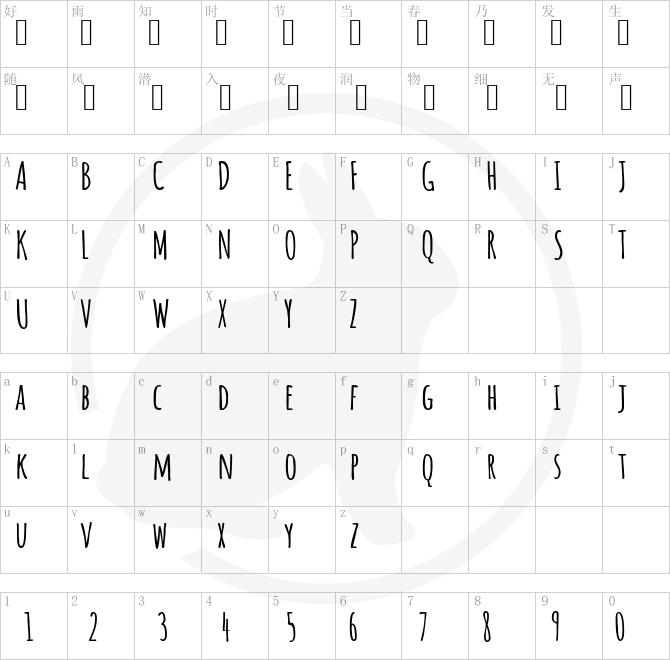
Amatic SC.ttf
Amatic SC 字體參數
Font type:
字體風格:
閱讀次數:110
發布時間:2025-05-20
字體大小:0.15MB
字體類型:ttf
MD5:fe9630dffdddcd1cdacbe8ea47a65672
Amatic SC.ttf字體轉換器控制臺

Amatic SC.ttf下載,Amatic SC下載,ttf類型字體下載,字體類型:ttf,字體大小:0.15MB。支持Windows、macOS、Linux系统下使用
- 字體分類:英文字體 {pboot:if('
- 字型名稱: Amatic SC
- 字型風格: Bold
- 字型識別碼: 2.505;NeWT;AmaticSC-Bold
- 字型全稱: Amatic SC Bold
- 字型版本: Version 2.505
- 字型字重: 700
- PS名: AmaticSC-Bold
- 版權: Copyright 2015 The Amatic SC Project Authors (https://github.com/googlefonts/AmaticSC) '!='')}
- 字型名稱: Amatic SC
- 字型風格: Bold
- 字型識別碼: 2.505;NeWT;AmaticSC-Bold
- 字型全稱: Amatic SC Bold
- 字型版本: Version 2.505
- 字型字重: 700
- PS名: AmaticSC-Bold
- 版權: Copyright 2015 The Amatic SC Project Authors (https://github.com/googlefonts/AmaticSC) {else}
- 字符集:Unicode UCS-2 {/pboot:if}
如何安裝Amatic SC?
Windows電腦安裝方法:請將字體Amatic SC.ttf(字體壹般為ttf\otf\ttc格式,如果是zip\rar格式需要解壓後復制)下載後拷貝到以下路徑: C:\Windows\Fonts
Mac蘋果電腦安裝字體方法:下載字體後,在檔案點兩下即可完成安裝。可到"字體簿"裡面查看所有已安裝的字體
Tags:





熱門的字體
TOP10
推薦的字體
- DCC - Ash.otf
- DEMENTO.ttf
- DESMINORE.ttf
- DF-Charliego.ttf
- DEVOTO FONT.ttf
- DF-GameOver.otf
- DF-Stromboli.otf
- 華康仿宋體W3-A.ttf
- DFChuW4U-B5.ttf
- DFHaiBaoW9L.ttf
- 華康黑體W5-A.ttf
- 화강태고딕체.ttf
- 화강태고딕체.ttf
- 화강중고딕체.ttf
- 華康楷體W5-A.ttf
- 화강태명조체.ttf
- 화강중명조체.ttf
- DFKai-SB.ttf
- DFPAiCingHua-B5.ttf
- DFLiuW3U-B5.ttf
- DFPBiaoKaiShu-B5.ttf
- DFPBanBo-B5.ttf
- DFPBangBangW5-B5.ttf
- DFPBangShuW8-B5.ttf
- DFPBiaoKaiShuBSE-B5.ttf
- DFPBiaoKaiShuBS-B5.ttf
- DFPBiaoKaiShuH-B5.ttf
- DFPBiaoSong-B5.ttf
- DFPBiaoKaiShuXX-B5.ttf
- DFPBuDingW12-GB5.ttf