FretQwik.ttf
FretQwik 字體參數
Font type:
字體風格:
閱讀次數:7
發布時間:2026-08-04
字體大小:0.05MB
字體類型:ttf
MD5:28feccca4728beee704558f7fd6902c8
FretQwik.ttf字體轉換器控制臺
FretQwik.ttf 字體映射表
- 字體名字:FretQwik.ttf
- 發布時間:2026-08-04
- 字體分類:英文字體
- 字體格式:.ttf
- 字體大小:0.05Mb
- 字型名稱:FretQwik
- 字型樣式:Regular
- 字型識別碼:RobertAllgeyer: FretQwik: 2002
- 字型全名:FretQwik
- 字型版本:Version 2.40
- 字重類型:400
- PostScript:FretQwik
- 字符數量:192
- 版權資訊:Free public license.
FretQwik.ttf下載,FretQwik下載,ttf類型字體下載,字體類型:ttf,字體大小:0.05MB。支持Windows、macOS、Linux系统下使用
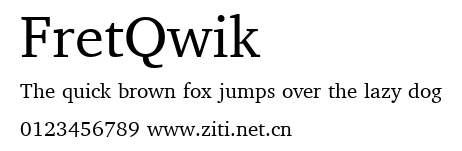
字型預覽圖
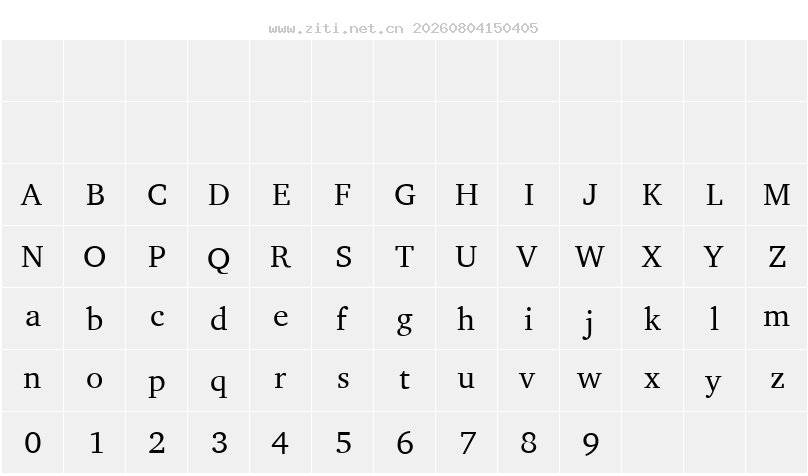
字體映射表
- 字型名稱: FretQwik
- 字型風格: Regular
- 字型識別碼: RobertAllgeyer: FretQwik: 2002
- 字型全稱: FretQwik
- 字型版本: Version 2.40
- 字型字重: 400
- PS名: FretQwik
- 字符數量: 191
- 版權: Free public license.
- 設計師: Robert Allgeyer (Santa Cruz, CA USA)
- 製造商: Designed by an amateur: Free, and worth it!
- 描述: This is version 2.40. Version 2.10 added mini-Roman numerals. Version 2.20 modernized the codepage (a technical detail). Version 2.30 was not publicly released. In version 2.40, the small 0 character has been added at fret level and at nut level; character combo fr. has been added at fret level; and a half-space has been added. Also, some unused code locations have been temporarily filled with spaces, so that the codepage looks like that of other fonts. The current version is drop-in compatible with previous versions. However, older versions may be missing a few characters presently in the font. Version 2.40 also added FretQwikC, an alternative version of the font, with narrower fretboard. FretQwik and FretQwikC are separate fonts, but (except for shape of fretboard and associated items) are interchangeable. FretQwik is a special-purpose font for creating guitar fret diagrams as if they were text. The ASCII character range (keyboard characters) are the same as would be found in an ordinary text font. But in the upper code range, FretQwik has symbols that can be pieced together to form most common tablature diagrams. These characters can be selected from a character map utility, preferably one with 16 columns. How to use it: Using a character map, look for the fret grid symbol (it is at code location decimal 0176). Above the fret grid, at code 0160, is the non-breaking space. In the column adjacent to the fret grid, there are dots representing finger positions. In the same row as the non-breaking space there is an open circle positioned above the fret grid. Below it is a filled circle at the first finger position, and so on down the column. Begin with a fret grid. Place a dot for the first string. Move to the next string using the non-breaking space. Place a dot for the second string. Continue. You may omit a dot on any string, but you must use the non-breaking space to move from string to string. You may also place arcs across the strings. An arc is placed at its leftmost point. Arcs in the same row as the non-breaking space will be positioned above the fret grid. Moving down the rows, arcs move further down the fretboard. The width of arcs varies from the full width of the fretboard (in the column adjacent to the dots), down to merely spanning adjacent strings. There are also some other symbols useful for spelling the chord name. This font was derived (modified) by Robert Allgeyer using Bitstream Charter Type 1 font distributed under free public license as part of Ghostscript. The following permission accompanies the distribution: "(c) Copyright 1989-1992, Bitstream Inc., Cambridge, MA. You are hereby granted permission under all Bitstream propriety rights to use, copy, modify, sublicense, sell, and redistribute the 4 Bitstream Charter (r) Type 1 outline fonts and the 4 Courier Type 1 outline fonts for any purpose and without restriction; provided, that this notice is left intact on all copies of such fonts and that Bitstream's trademark is acknowledged as shown below on all unmodified copies of the 4 Charter Type 1 fonts. BITSTREAM CHARTER is a registered trademark of Bitstream Inc."
字符映射圖
如何安裝FretQwik?
Windows電腦安裝方法:請將字體FretQwik.ttf(字體壹般為ttf\otf\ttc格式,如果是zip\rar格式需要解壓後復制)下載後拷貝到以下路徑: C:\Windows\Fonts
Mac蘋果電腦安裝字體方法:下載字體後,在檔案點兩下即可完成安裝。可到"字體簿"裡面查看所有已安裝的字體
FretQwik下載
个人非商用下载字體版權提示
1、只有標識為免費可商用的字體方可免費商用,其他的字體僅供個人試用,如果用於商業用途請聯系版權方購買授權。
2、如果用護上傳的字體文件侵犯了您的權利,請及時通知我們,我們會在1個工作日斷開下載鏈接





熱門的字體
TOP10
推薦的字體
- DCC - Ash.otf
- DEMENTO.ttf
- DESMINORE.ttf
- DF-Charliego.ttf
- DEVOTO FONT.ttf
- DF-GameOver.otf
- DF-Stromboli.otf
- 華康仿宋體W3-A.ttf
- DFChuW4U-B5.ttf
- DFHaiBaoW9L.ttf
- 華康黑體W5-A.ttf
- 화강태고딕체.ttf
- 화강태고딕체.ttf
- 화강중고딕체.ttf
- 華康楷體W5-A.ttf
- 화강태명조체.ttf
- 화강중명조체.ttf
- DFKai-SB.ttf
- DFPAiCingHua-B5.ttf
- DFLiuW3U-B5.ttf
- DFPBiaoKaiShu-B5.ttf
- DFPBanBo-B5.ttf
- DFPBangBangW5-B5.ttf
- DFPBangShuW8-B5.ttf
- DFPBiaoKaiShuBSE-B5.ttf
- DFPBiaoKaiShuBS-B5.ttf
- DFPBiaoKaiShuH-B5.ttf
- DFPBiaoSong-B5.ttf
- DFPBiaoKaiShuXX-B5.ttf
- DFPBuDingW12-GB5.ttf